
A loan schedule can be worked out in an afternoon, in a spreadsheet. Principal, interest, remaining balance, twelve or sixty rows. It is not hard maths, and that is not why accountants struggle with loans.
The trouble starts once the contract begins to move. The bank changes the rate in month 14, and you already have thirteen months of posted journal entries. The lease has a residual value you only buy at the end, yet interest accrues on it every month. The loan is in euro, so the balance has to be revalued monthly. The contract is settled early.
Each of those situations, solved in a spreadsheet, means a new file and a reconciliation against the accounts. The l10n_ro_account_loan module from the NextERP localization keeps them all in the same document.
1. The loan type, defined once
Before the first loan you define a loan type: the accounts it works on and the default duration.
The accounts are the Romanian ones — 167x for the loan itself, 168x for the related interest, 666x for the interest expense. You set them once on the type, and the loans that follow inherit them.
It is a small step that prevents an expensive mistake: a loan booked to the wrong account is usually discovered at the annual accounts.
2. Two amortization methods
When the schedule is generated you choose how it amortizes:
- constant principal — the principal repaid each month is fixed, so the interest and the total payment decrease over time;
- constant annuity — the monthly payment is fixed, and inside it the principal grows as the interest falls.
Interest is computed on the remaining balance, with the monthly rate derived from the annual one. The schedule is built from a button, and on confirming the loan the interest entries are created in the chosen journal, posted at their date.

You can also reduce what gets amortized, through two fields:
- the advance paid at the start, which lowers the financed principal and can be linked to the document that recorded it — the supplier invoice or the bank entry;
- the imported amount and duration, for a loan that was already running before it entered Odoo. You do not rebuild the history; you declare where you start from.
3. Financial leasing: the residual value
A financial lease is not a loan under another name. The difference is the residual value — the amount you pay at the end to actually buy the asset.
You fill it in either as a percentage of the asset value or as an amount; the two fields recompute each other. Three things follow from it in the schedule:
- Only the financed amount minus the residual is amortized across the installments.
- Interest accrues on the whole outstanding balance, residual included — exactly as in a real lease, where you pay interest on the part you have not bought yet.
- At the end there is a separate line, flagged as residual value, which repays the buyout amount as principal. It carries no extra interest, because the interest on the residual was already paid month by month.
Concretely: an asset of 12,000, an advance of 2,000, 10 months, a 20% residual. Financed 10,000, residual 2,400. The 10 installments amortize 7,600 — that is 760 a month at constant principal — and the final line repays the 2,400. The schedule has 11 lines, not 10, and the contract end date is the buyout date.
4. When the rate changes mid-contract
This is the part that makes the system worth it.
You add a config line to the contract with the new rate and the date it applies from, then press Recalculate on it. The future installments, the ones not yet posted, are regenerated at the new rate. The residual line stays where it is, at the end of the schedule.
What has already been posted is not touched. Not because it would be hard to touch, but because a closed month is not rewritten. If you do want to regenerate over posted entries, the system stops you and asks you to reset them to draft first — that is, to do explicitly something that would otherwise happen quietly.
5. Foreign-currency loans
A loan in euro has a balance whose value in lei changes every month, without anyone paying anything.
The module ties into l10n_ro_account_currency_reevaluation and automatically revalues the outstanding balance, with FX difference entries at month end. It is the same mechanism that handles the rest of the foreign-currency accounts, not a parallel one — so FX differences from loans show up in the same report as the others.
6. The link to journal entries
Every installment in the schedule is linked to the journal entry it generated, and every entry line knows which installment it came from.
It sounds like a technical detail. In practice it means that, from an amount in the trial balance, you can reach the installment and the contract it comes from in two clicks — without asking anyone and without searching through files.
7. Loan analysis
There is a separate analysis menu, with a pivot and a graph, for reporting across all contracts: how much principal, how much interest, what commissions, over what period.
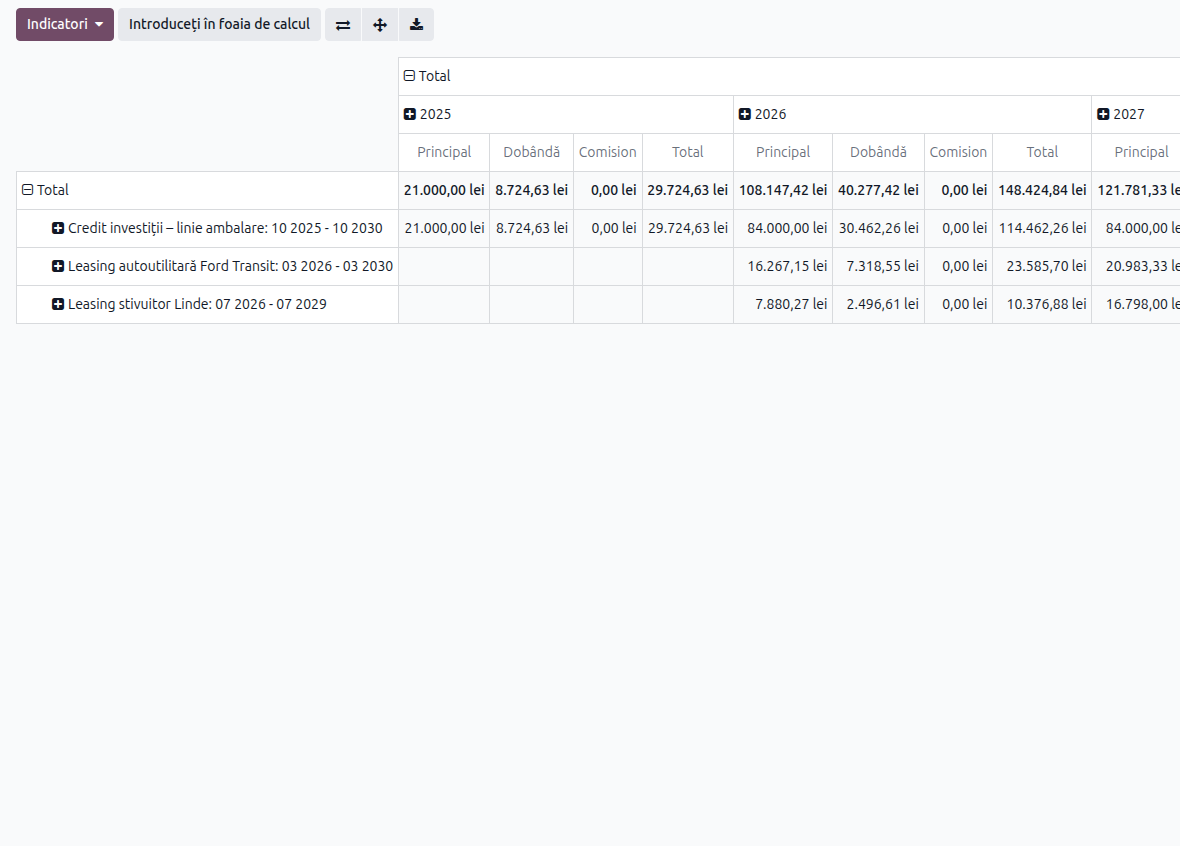
It answers the question the finance director asks, not the accountant: what do the borrowed funds cost us in total this year.
What to check on first setup
- The loan types carry the accounts that match your chart:
167x,168x,666x. If you customized the chart, check them before the first contract. - The journal the interest entries post into is the one you expect, not the default.
- For foreign-currency loans, the revaluation module is installed and configured — otherwise the balance stays at the opening rate.
- For contracts already running, you use the imported amount and duration instead of rebuilding the history from scratch.
Why it is worth doing in the system
Not for the arithmetic. Anyone can do the arithmetic.
Because a lease contract lives five years, and in five years the rate changes twice, the person who kept the file leaves, an early repayment happens, and an auditor turns up asking why the interest in month 31 does not match the contract.
When the schedule, the journal entries and the contract are the same object, answering that takes a minute. When they are three files, it takes a day — and sometimes the answer is never found.
We work with the Romanian localization on Odoo 19 and 20, for NextERP customers. If you have more than two or three loan or lease contracts and keep them in separate files, let's talk.