
In Odoo you choose on the form who pays an expense: the employee, in which case the company reimburses them, or the company, directly. Either way the expense is a self-contained operation — it starts from zero and closes on its own.
Romanian practice adds one step before that, not out of habit but because of how the books are kept: the company hands over the money first — the treasury advance — and the employee spends from it. At the end the question is not "how much do we owe them", but "where does the account stand": how much they received, how much they accounted for, how much they returned, how much is still in their hands.
The difference looks like vocabulary. It is structure. An advance is not a transaction that closes, but an amount that is drawn down as the person produces receipts — and whatever remains unaccounted for carries over to the next expense report, per employee.
The Romanian expense report rests on that running balance. The l10n_ro_employee_expense module from the NextERP localization adds it to Odoo's standard flow.
1. Three transaction types, one chain
Every expense gets a Transaction type field, with three values:
- Advance — money handed to the employee before anything is spent;
- Expense — the actual justification, with a document;
- Return — what they hand back at the end, if money is left over.
The three build the chain. Four amounts are computed on every record, in the company currency:
| Field | What it shows |
|---|---|
| Balance start | what the employee held before this operation |
| Advance | what they received now |
| Return | what they handed back now |
| Balance end | what is left to account for or to return |
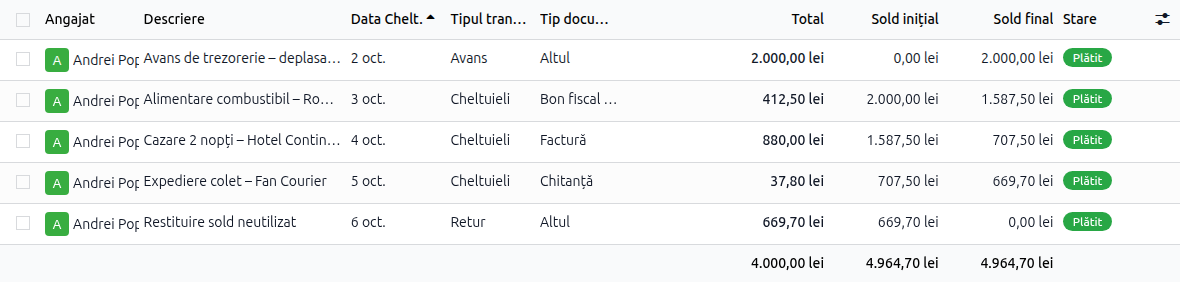
These are stored and automatically recomputed fields, chained per employee and per date. It is not a report that adds things up at month end: the balance sits on the document, the moment you look at it.
2. The advance comes from the bank statement
The part that saves the most time is not on the expense form, but on the statement.
When you hand over an advance, the operation is first of all a payment from the bank or the cash register. It shows up in the statement anyway. It would make no sense to key it in a second time as an expense document.
The module links the two. Two new fields appear on the statement line: Employee and Expenses. When you set the employee on the line and save, the matching advance expense is created automatically and linked to that line. If you change the employee or delete the line, the automatically created advance is cleaned up just as quietly — no orphan records left to corrupt the balance.

The fields are also visible in the bank reconciliation widget, in both the list and the kanban of statement lines, so matching can be done without opening each line.
3. When an expense settles a vendor bill
A frequent case: the employee pays a vendor's invoice on the spot — from the advance, from a company card or out of their own pocket.
This is not a new expense in the books. The invoice already exists, with its VAT and its accounts. What is missing is settling it.
The expense form has two fields for this: Expense vendor and Vendor bill. When you fill in the bill and confirm the expense, the payment entry that is generated is reconciled automatically against that bill. Nothing is left to match by hand, and the classic duplicate — once as the invoice, once as the expense — never appears to inflate the month's costs.
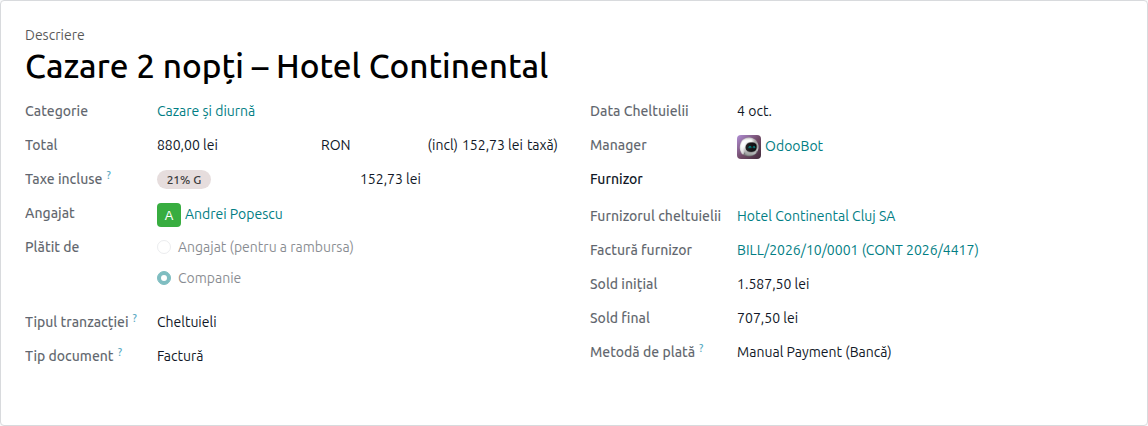
For this case the module installs a dedicated product, Invoice payment (code INVPAY), whose expense account is 401100 Suppliers. The expense report does not pass through class 6, because the cost was already booked by the invoice.
4. The type of supporting document
The second field that matters to the accountant is Document type, with the values: invoice, simplified invoice, fiscal receipt with VAT, receipt, other.
It is not a decorative label. What can be deducted depends on the type of document, and under an audit the difference between an invoice and a receipt is exactly the difference between a deductible cost and one that is not. With the type on the record, the sorting happens in the system, not by leafing through a folder of till slips.
5. The company always pays
Odoo has a Paid by field on the expense, with two values: the employee or the company.
In the Romanian treasury-advance flow the answer is always the company: the money already left the company's cash register or bank account when the advance was handed over. The module sets the value to company automatically on every expense, if the company has the Romanian localization active.
It is a small detail that prevents an entire class of errors: an expense marked "paid by employee" creates a liability towards them, which then no longer matches the advance balance.
6. The Decont report
Finally, the document that gets printed and signed. The module adds the Decont report, separate from Odoo's standard expense report, built to the structure a Romanian accountant expects: the employee, the period, the supporting documents with their type, and the account — balance start, advances, expenses, returns, balance end.
What to check on first setup
- The fiscal localization is set to Romania on the company (
Settings → Accounting → Fiscal Localization). Without it, the specific behaviours do not switch on. - The two system products exist and carry accounts that match your chart: Invoice payment (
INVPAY), tied to401100 Suppliers, and Advance / payment expense (ADVEXP), tied to581000 Internal transfers. If you customized the chart of accounts, check them before the first expense report, not after. - The Employee field appears on statement lines. If you do not see it, check the access rights and that you are working on the company with the Romanian localization.
- The payment mode is the company, on expenses that already exist.
Why it is worth doing in the system
The argument is not the time saved on data entry — it is saved, but that is not the point.
The argument is that the advance balance is a receivable from the employee, and a receivable kept in a separate file is not a receivable, it is a memory. When someone leaves the company with an unaccounted advance, the difference between the two shows up immediately.
A system that carries the balance on every record tells you at any moment, without anyone computing anything, who still owes what. And at month end there is no longer a step called "reconcile the spreadsheet with the accounts".
We work with the Romanian localization on Odoo 19 and 20, for NextERP customers. If you hand out treasury advances and track them outside your accounting, let's talk.