
There is a class of problems that only appears after you have solved e-Factura.
The invoice passes the ANAF validator. The schema is correct, the signature is good, the SPV accepts it. And the customer still refuses it — because they cannot find their own purchase order number in it, their own article code, or the contract reference.
The ANAF validator checks whether the XML follows the standard. The buyer checks whether they can process it automatically in their own system. Those are two different things, and the second one is not solved by a setting.
Odoo builds the same XML for every partner. Customers do not all ask for the same thing.
What it looks like in practice
Four situations that turn up at almost any supplier with large customers:
A retail chain. The buyer reconciles on its own purchase order number and its own article codes, and refuses whatever does not carry them. The order reference, the delivery point and the buyer's article code have to be filled in — the last one on every line.
A public institution. The tender or lot reference has to travel with the invoice, and the contract number alongside it.
A customer with its own cost centres. They want their accounting code on the invoice, so that it reaches the right department on their side.
A buyer that refuses a tag. Some validators reject exactly what Odoo fills in by default. Here nothing has to be added — something has to be removed.
The usual answer is a development per customer. Three retail chains, three modules to maintain.
1. A catalog, not an XML path
The module brings a catalog of CIUS-RO tags — around thirty of the ones commonly asked for — each named after its business term and explained in one line.
That changes who can do the configuration. A path like cac:OrderReference/cbc:ID needs somebody who knows UBL. "The buyer's order reference", picked from a list, needs somebody who knows the customer.
For the cases the catalog does not cover yet there is still the custom path option, but it is reserved for technical users.
2. The rule: what gets filled, and from where
A rule has four things:
- the tag to fill, picked from the catalog;
- where the value comes from — a field read off the invoice or off its line (for instance the reference of the delivery address or the product barcode), a fixed text, an expression for what cannot be read off a single field, or remove the node;
- which documents it applies to — invoices, credit notes or both. Tags that exist on only one of the two are narrowed down automatically by the catalog;
- whether it overwrites what Odoo computed, or only fills in when Odoo left it empty.
There is one more checkbox that matters a lot: required. A rule marked that way stops the export with an explicit error if it produces no value, instead of letting the invoice leave without it.
3. Profiles, for families of customers
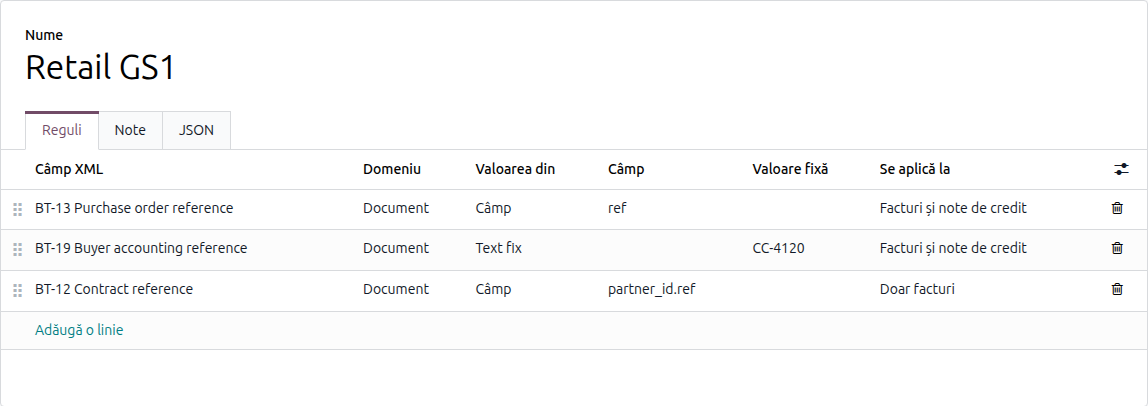
If all forty stores of one chain ask for the same thing, the configuration is done once.
A profile is a set of rules, then attached to every partner in that family. And the profile moves to another database by copy-paste: the profile has a JSON tab with its rules, and the target database has an import button.
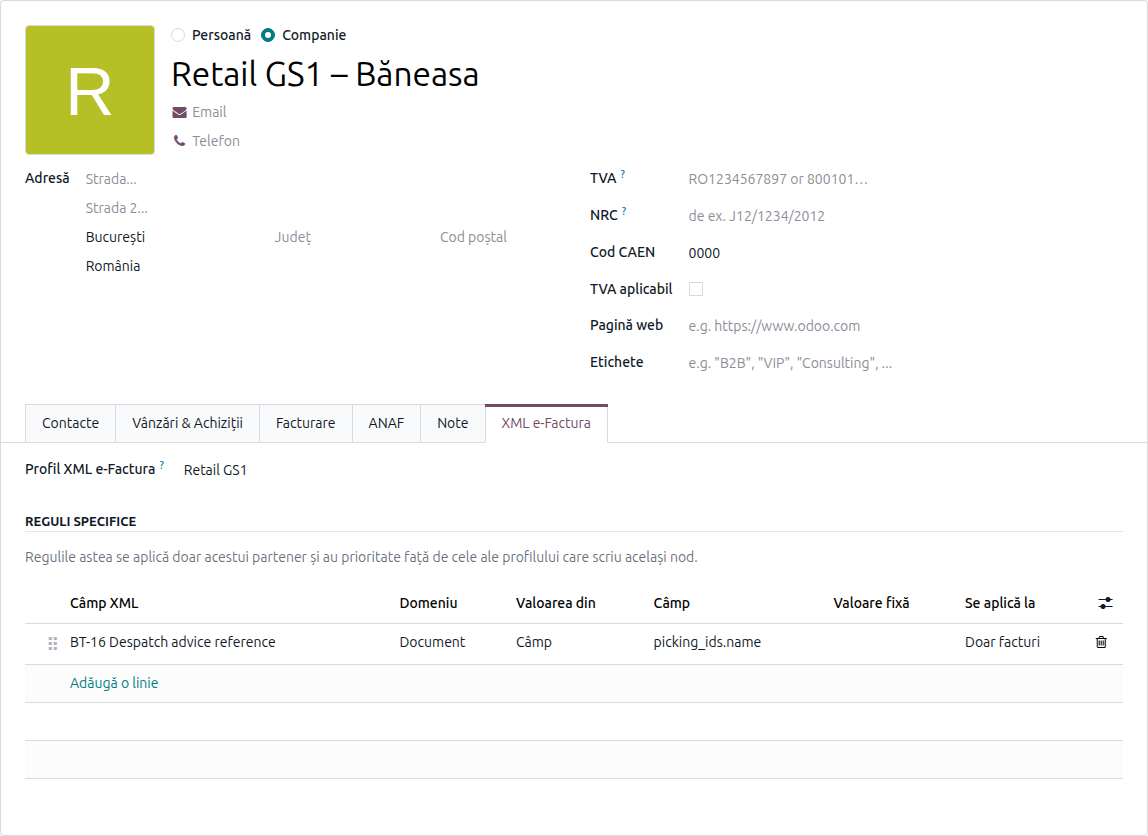
For partners that have, on top of the profile, a requirement of their own, the rules go directly on the partner.
4. Who wins, when two rules write the same thing
The order is simple and worth knowing, because it is the only place where the configuration can become confusing:
- a rule on the partner beats a rule from the profile, if they write the same tag;
- a contact inherits the company's rules and can refine them; between two rules writing the same tag, the one on the contact wins.
That covers the real case: the chain has a profile, and one single store in it asks for something extra.
5. What gets checked, and when
Two checks, at two different moments.
When the rule is saved: a path that does not exist in the e-Factura schema for that document type is refused on the spot. Without it, the mistake would only show at XML generation time, as a rendering error.
When the XML is generated: a rule marked as required that produced no value stops the export, with a message naming the rule and the partner. It is not a warning in the log, it is a stop.
6. Who is allowed to edit
These rules decide what gets filed with ANAF. That is why the module ships a separate access right, granted to nobody by default.
Someone who can edit a partner does not automatically gain the right to change what is sent in that partner's XML. It is a separation you appreciate right after the first time somebody "just tweaked" a rule.
What to check on first setup
- A test invoice for the configured partner: generate the XML and open the attached file. Is the tag there, with the expected value?
- A credit note for the same partner, if the rule applies to both.
- A required rule with no value, deliberately: does the export really stop, with the right message?
- A partner without a profile — their invoice must come out exactly as before.
- The access right: those who should have it, do; the others, do not.
Why it is worth it
Not because it is elegant, but because the alternative shows up in the invoice.
A development per customer means code to maintain at every Odoo version, for a requirement that changes when the customer changes their own ERP. A rule in the interface is modified in two minutes, by the person who spoke to the customer.
And in the meantime, the invoices stop coming back.
The module is on Odoo Apps, for Odoo 19 and 20. If you have customers refusing invoices over missing references and you were considering a development, let's talk.